

一、Netty基本内容
1.什么是netty?
Netty是一个异步的、基于事件驱动的网络应用框架,用于快速开发可维护、高性能的网络服务器和客户端。
异步的:客户端尽管发,不会阻塞服务端处理主线程。
事件驱动:基于 Java NIO(Non-blocking I/O)的 Selector 实现的。
Netty 的核心设计目标是:
- 高性能:充分利用 Java NIO 的非阻塞特性。
- 可扩展性:适用于从简单客户端到复杂服务器的大多数网络应用场景。
- 易用性:提供高度抽象的 API,屏蔽 NIO 编程的复杂细节。
2. Netty 的核心特性
- 异步和事件驱动
- Netty 的通信是基于事件驱动的,事件由事件循环管理。
- 异步特性让 Netty 在处理高并发时具有天然优势,避免阻塞操作。
- 高效的线程模型
- Netty 使用少量线程处理大量连接,通过 I/O 多路复用机制实现。
- 默认采用 Reactor 模式,分为 Boss 和 Worker 两类线程。
- 灵活的编解码
- 提供丰富的编码器和解码器支持,包括 Protobuf、HTTP、WebSocket 等。
- 支持自定义协议解析。
- 内存管理
- 使用内置的 ByteBuf 代替 Java 的 ByteBuffer,提供动态扩展、零拷贝等高效操作。
3. 初识 netty
在讲解netty核心组件之前,我们先通过一个简单的示例,对netty有一个整体的认识。
这个示例演示的是netty处理I/O请求的能力。
需要注意的是,此示例由于我们没有指定绑定IP,故会监听所有网卡的8888端口。
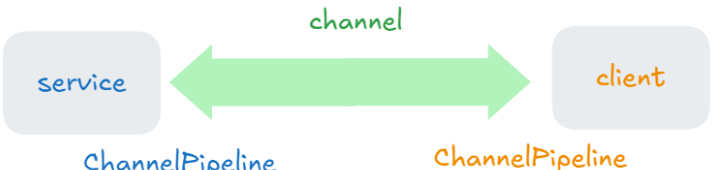
service代码中,我们配置了一个线程池 group,用来监听到客户端的建立请求(connect)和处理 I/O 操作,当客户端发送connect时服务端会调用initChannel 方法初始化客户端和服务端建立的管道 channel,之后服务端和客户端可以通过这个channel来发送和接受消息(由 group 处理)。
这个channel中有ChannelPipeline,所有通过channel接收或发送的消息都会经过ChannelPipeline中添加的方法来处理。
这个示例中我们只添加了当触发读事件时,通过建立的channel来获取消息,并通过服务端的ChannelPipeline来解码打印输出。
备注:
- 解码:二进制转成字符串
- 编码:字符串转成二进制
代码具体实现:
public class Service {
    public static void main(String[] args) {

        NioEventLoopGroup group = new NioEventLoopGroup();

        // 1. 配置和启动 Netty 服务端
        // ServerBootstrap 负责设置服务端的各项配置,包括线程池、通道类型、事件处理器等。
        new ServerBootstrap()
                // 2. 将 group(线程池) 配置到 ServerBootstrap 中。
                .group(group)
                // 3. 指定了服务端使用的通道类型 NioServerSocketChannel,用于监听客户端连接
                .channel(NioServerSocketChannel.class)
                // 4. 设置连接到服务端的每个客户端的通道(NioSocketChannel)如何初始化
                .childHandler(
                        new ChannelInitializer<NioSocketChannel>() {
                            // 6. 每当有新的客户端向服务端建立连接(connect)时,调用initChannel初始化服务端的ChannelPipeline
                            @Override
                            protected void initChannel(NioSocketChannel sc) throws Exception {
                                // 当服务端收到客户端信息时经过ChannelPipeline的处理
                                sc.pipeline().addLast(new StringDecoder());
                                sc.pipeline().addLast(new ChannelInboundHandlerAdapter() {
                                    @Override   // 处理接收到的消息
                                    public void channelRead(ChannelHandlerContext ctx, Object msg) throws Exception {
                                        System.out.println(msg);
                                    }
                                });
                            }
                        }
                )
                // 5. 绑定端口 8888 并启动服务,注意,由于我们没有指定绑定IP,故会监听所有网卡的8888端口
                .bind(8888);
    }
}
client代码中,我们配置了一个线程池group,添加了解码器,并在和服务端建立连接后通过channel发送 hello world 消息,通过channel 发送的消息会经过客户端的ChannelPipeline,ChannelPipeline对发送的消息进行了编码。(转成二进制)
public class Client {
    public static void main(String[] args) throws InterruptedException {

        // 1. 创建一个 EventLoopGroup,用于客户端的 I/O 操作
        NioEventLoopGroup group = new NioEventLoopGroup();

        // 2. 配置和启动 Netty 客户端
        new Bootstrap()
                // 3. 将 group 配置到 Bootstrap 中,负责客户端的 I/O 操作
                .group(group)
                // 4. 指定了客户端使用的通道类型(NioSocketChannel 用于基于 NIO 的 socket 通信)
                .channel(NioSocketChannel.class)
                // 5. 配置客户端的 ChannelPipeline
                .handler(new ChannelInitializer<NioSocketChannel>() {
                    // 7. 当客户端向服务端建立连接(connect)时调用initChannel初始化客户端的ChannelPipeline
                    @Override
                    protected void initChannel(NioSocketChannel sc) throws Exception {
                        // 发送消息时执行 ChannelPipeline 中的操作
                        sc.pipeline().addLast(new StringEncoder());
                    }
                })
                // 6. 连接到服务端的 8888 端口
                .connect(new InetSocketAddress("localhost", 8888))
                // 8. 阻塞等待直到连接成功
                .sync()
                // 9. 获取客户端和服务端之间的 Channel
                .channel()
                // 10. 向服务端发送消息
                .writeAndFlush("hello world");

        // 12. 关闭客户端的 EventLoopGroup,释放资源
        group.shutdownGracefully();
    }
}service、client、channel、channelPipeline的关系
二、Netty 的核心组件
1. EventLoop 和 EventLoopGroup
1.1 基本概念
EventLoop 是一个 单线程的事件循环,用于处理 I/O 操作、普通任务和定时任务。
- I/O 事件处理:
EventLoop会循环监听和处理 I/O 事件(如网络连接、数据读取、数据写入等) - 任务调度:
EventLoop可以执行异步任务,通常是定时任务或需要在 I/O 线程上执行的任务。
EventLoopGroup 是多个 EventLoop 的容器,负责管理其生命周期,并为 Netty 中的 I/O 操作分配线程。
- 负责创建、分配和管理多个
EventLoop, 每个EventLoop绑定一个独立的线程。 - 为每个新连接(
Channel)分配一个EventLoop,保证Channel 的事件总是由同一个EventLoop处理。 - 将任务(普通任务、定时任务、I/O 事件)分配到
EventLoop中运行。
1.2 与 Channel 关联
-
EventLoopGroup 管理多个EventLoop, 每个EventLoop与一个线程绑定。 - 一个
EventLoop 内部维护了一个selector 来管理服务多个Channel。 - 每个
Channel 绑定到唯一的EventLoop,从而保证线程安全。
                 |-------(线程1)EventLoop1 ─── Channel1
                 |                   └─ Channel2
                 |                   └─ Channel3
   EventLoopGroup
                 |-------(线程2)EventLoop2 ─── Channel4
                                    └─ Channel5
1.3 EventLoopGroup 的实现
EventLoopGroup 是一个接口,我们创建对象时要创建接口的实现,其中前三个可以处理 io操作、普通任务、定时任务,第四个不能处理I/O操作
| 实现 | 描述 |
|---|---|
NioEventLoopGroup | 基于 Java NIO 的 Selector,实现跨平台支持。线程池,可指定线程数,默认是cpu核心数 * 2 |
EpollEventLoopGroup | 基于 Linux epoll 的实现,性能更高,但只支持 Linux。 |
KQueueEventLoopGroup | 基于 macOS 和 BSD 系统的 kqueue 实现,性能更高,但只支持这些平台。 |
DefaultEventLoopGroup | 不处理 I/O 操作,仅用于普通任务调度或定时任务。只有一个线程 |
1.4 常用方法
-
EventLoop的方法
| 方法 | 功能 |
|---|---|
next() | 获取当前EventLoop的下一个EventLoop,通常用于轮询分配。 |
submit | 提交一个有返回值的任务到当前的EventLoop中,返回一个Future用于获取结果。 |
execute(Runnable task) | 提交一个任务到当前EventLoop的任务队列中执行。 |
schedule | 提交一个延迟执行的任务到当前EventLoop的任务队列中执行。 |
scheduleAtFixedRate | 提交一个周期性任务,每隔固定时间间隔执行。 |
scheduleWithFixedDelay | 提交一个任务,每次执行完成后等待固定延迟时间再执行下一次。 |
parent() | 获取当前EventLoop所属的EventLoopGroup。 |
register(Channel channel) | 将一个Channel注册到当前EventLoop,并返回异步结果ChannelFuture。 |
inEventLoop() | 判断当前线程是否属于此EventLoop。 |
inEventLoop(Thread thread) | 判断指定线程是否属于此EventLoop。 |
shutdownGracefully() | 优雅地关闭当前EventLoop,完成已有任务并释放资源。 |
-
EventLoopGrop的方法
| 方法 | 功能 |
|---|---|
next() | 获取一个EventLoop,通常采用轮询方式分配。 |
execute(Runnable task) | 提交一个任务到某个EventLoop的任务队列中。 |
schedule() | 提交一个延迟或周期性任务。 |
shutdownGracefully() | 优雅地关闭所有EventLoop,释放资源。优雅地是指停止接受新任务,等待之前接收到的任务执行完 |
1.5 执行任务
EventLoopGroup group = new NioEventLoopGroup(4); // 创建一个包含4个线程的 EventLoopGroup

// 获取EventLoop
EventLoop eventLoop1 = group.next(); // 获取一个 EventLoop
EventLoop eventLoop2 = group.next(); // 轮询获取下一个 EventLoop

// 提交任务,立即执行
eventLoop1.execute(() -> {
    System.out.println("Task executed in EventLoop1: " + Thread.currentThread().getName());
});

// 提交任务,延迟执行
eventLoop2.schedule(() -> {
    System.out.println("Scheduled task executed in EventLoop2");
}, 3, TimeUnit.SECONDS); // 延迟3秒执行任务

// 关闭 EventLoopGroup
group.shutdownGracefully(); // 优雅关闭所有 EventLoop
1.6 细分 EventLoopGroup
在一开始给大家的代码中只用到了一个线程池来处理连接请求(connect)和处理I/O。在实际开发中一般会单独用一个线程来处理连接请求,另一个线程池来处理I/O操作。
同时,对于比较复杂的不涉及I/O操作的任务,我们也可以再创建一个线程池来专门处理。
下面代码补充了上面讲的这两个功能。
需要注意的是,此示例由于我们没有指定绑定IP,故会监听所有网卡的8888端口。
public class Service {
    public static void main(String[] args) {
        // 创建两个 EventLoopGroup,分别处理 Boss Group 线程池 和 Worker Group 线程池
        EventLoopGroup bossGroup = new NioEventLoopGroup(1); // 只需要一个线程来接受客户端的连接请求
        EventLoopGroup workerGroup = new NioEventLoopGroup(); // 默认为 CPU 核数 * 2 个线程处理 I/O 操作
        DefaultEventLoopGroup defaultGroup = new DefaultEventLoopGroup(1);

        // 1. 配置和启动 Netty 服务端
        // ServerBootstrap 负责设置服务端的各项配置,包括线程池、通道类型、事件处理器等。
        new ServerBootstrap()
                // 2. 将 Boss Group 和 Worker Group 配置到 ServerBootstrap 中。
                // bossGroup 负责处理客户端的连接请求,workerGroup 负责处理已连接客户端的 I/O 操作
                .group(bossGroup, workerGroup)
                // 3. 指定了服务端使用的通道类型 NioServerSocketChannel,用于监听客户端连接
                .channel(NioServerSocketChannel.class)
                // 4. 设置连接到服务端的每个客户端的通道(NioSocketChannel)如何初始化
                .childHandler(
                        new ChannelInitializer<NioSocketChannel>() {
                            // 6. 每当有新的客户端向服务端建立连接(connect)时,调用initChannel初始化服务端的ChannelPipeline
                            @Override
                            protected void initChannel(NioSocketChannel sc) throws Exception {
                                // 当服务端收到客户端信息时经过ChannelPipeline的处理
                                sc.pipeline().addLast(new StringDecoder());
                                sc.pipeline().addLast("handle1", new ChannelInboundHandlerAdapter() {
                                    @Override   // 处理接收到的消息
                                    public void channelRead(ChannelHandlerContext ctx, Object msg) throws Exception {
                                        System.out.println(msg);
                                        // 提交任务到 DefaultEventLoop 中来执行 handle2
                                        defaultGroup.submit(() -> {
                                            // 在 DefaultEventLoop 中处理消息
                                            System.out.println("Handle2: " + msg);
                                        });
                                    }
                                });
                            }
                        }
                )
                // 5. 绑定端口 8888 并启动服务
                .bind(8888);
    }
}
2. Channel
Channel 是 Netty 中用于数据传输的核心组件,代表了 I/O 操作的端点。它用于处理连接、接收和发送数据,并且与具体的 I/O 模型(如 NIO、Epoll 或 KQueue)紧密集成。
- Channel 主要用于处理 I/O 操作,支持异步 I/O 事件的处理和数据传输。
- 在 Netty 中,Channel 是与客户端和服务端之间的连接一一对应的。
2.1 Channel 的类型
Netty 提供了多种类型的 Channel,每种类型根据不同的协议和传输方式进行优化。常见的 Channel 类型如下:
| 类型 | 描述 |
|---|---|
NioServerSocketChanne | 基于 Java NIO 的 TCP 服务器通道,专门用于监听和接受传入的 TCP 连接请求。 |
NioSocketChannel | 基于 Java NIO 的 TCP 客户端与服务端通道,通常用于实现基于 TCP 协议的连接。 |
EpollServerSocketChannel | 基于 Linux epoll 的 TCP 服务器通道,仅支持 Linux 系统,用于监听 TCP 连接请求。 |
EpollSocketChannel | 基于 Linux epoll 的通道,性能较高,只支持 Linux 系统,适用于需要高效 I/O 操作的场景。 |
NioDatagramChannel | 基于 Java NIO 的 UDP 通道,适用于 UDP 协议的网络通信。 |
2.2 Channel 的基本功能
Netty 的 Channel 提供了一些基础的操作,以下是最常用的一些功能:
- 连接管理: 用于创建、绑定、连接和关闭连接。
- 数据读写: 支持从 Channel 中读取数据和向 Channel 写入数据。
- 事件触发: 可以处理来自客户端或服务器的 I/O 事件(如接收数据、写入数据等)。
- 流量控制: 支持背压机制,控制数据的读写速率。
2.3 常用方法
| 方法 | 功能 |
|---|---|
connect(SocketAddress remoteAddress) | 连接到指定的远程地址(如服务端)。 |
close() | 关闭当前的 Channel,释放资源。 |
write(Object msg) | 向 Channel 写入数据。通常是发送到对方的缓冲区,数据并未立即发送,需要调用flush()方法来发送。 |
flush() | 刷新 Channel 缓冲区,将之前写入的数据发送出去。 |
read() | 从 Channel 中读取数据。 |
bind(SocketAddress localAddress) | 将 Channel 绑定到本地地址,监听来自客户端的连接请求。 |
isOpen() | 检查 Channel 是否已打开。返回true表示可以继续使用该 Channel,false则表示已经关闭。 |
isActive() | 检查 Channel 是否是活动的,即是否已经连接上远程地址并处于有效状态。 |
eventLoop() | 获取当前 Channel 所绑定的 EventLoop。 |
config() | 获取 Channel 配置信息,返回一个 ChannelConfig 对象,包含各种 I/O 配置选项。 |
2.4 ChannelPipeline
ChannelPipeline 是一个链式结构,负责管理 I/O 操作的处理逻辑。在一个 Channel 中,每个数据的读取、写入操作都会经过一系列处理器(ChannelHandler)的加工。这些处理器可以执行多种任务,如编码、解码、协议解析等。
- ChannelHandler:用于处理 I/O 操作的具体业务逻辑,如编解码、业务处理、异常处理等。
- ChannelPipeline:由多个
ChannelHandler 组成,形成一个处理链。每当发生 I/O 事件时,事件会在ChannelPipeline中按照顺序流动,逐个交给对应的处理器处理。
2.5 获取和关闭channel
由于connect和close方法是异步执行的,也就是在另外的线程中执行,主线程只负责调用,所以获取 channel 分为两种情况,一种是在主线程中获取channel并执行业务代码,另一种情况是在执行connect的线程执行业务代码。
关闭channel同理,要么是主线程,要么是close的线程。
- 客户端通过同步的方式获取和关闭
channel
public class Client {
    private static final Logger log = LoggerFactory.getLogger(Main.class);
    public static void main(String[] args) throws InterruptedException {
        ChannelFuture connectFuture = new Bootstrap()
                .group(new NioEventLoopGroup())
                .channel(NioSocketChannel.class)
                .handler(new ChannelInitializer<NioSocketChannel>() {
                    @Override
                    protected void initChannel(NioSocketChannel ch) throws Exception {
                        ch.pipeline().addLast(new StringEncoder());
                    }
                })
                .connect("localhost", 8888);

        // 1. 在主线程中获取channel,并输出
        connectFuture.sync();    // 阻塞,直到connect线程执行成功
        Channel channel = connectFuture.channel();
        log.info("{}", channel);

        new Thread(() -> {
            Scanner sc = new Scanner(System.in);
            while (true) {
                String line = sc.nextLine();
                if ("q".equals(line)) {
                    channel.close();
                    // close是异步的,所以如果在close后面直接写善后工作的代码,无法保证其在close之后执行
                    break;
                }
                channel.writeAndFlush(line);
            }
        }).start();

        // 2. 关闭channel, 并执行关闭后的善后工作
        ChannelFuture closeFuture = channel.closeFuture();  // 获取关闭的结果
        closeFuture.sync(); // 阻塞, 直到调用close
        log.info("{}", closeFuture);
    }
}
上述代码的控制台输出如下:
// 控制台输出
20:29:15.955 [main] - [id: 0xa8522feb, L:/127.0.0.1:2185 - R:localhost/127.0.0.1:8888]
20:29:15.960 [main] - 0
20:29:15.960 [main] - 1
hello
q
20:29:42.378 [main] - AbstractChannel$CloseFuture@70e9c95d(success)- 客户端通过异步的方式获取和关闭
channel
public class Client {
    private static final Logger log = LoggerFactory.getLogger(Main.class);
    public static void main(String[] args) throws InterruptedException {
        ChannelFuture connectFuture = new Bootstrap()
                .group(new NioEventLoopGroup())
                .channel(NioSocketChannel.class)
                .handler(new ChannelInitializer<NioSocketChannel>() {
                    @Override
                    protected void initChannel(NioSocketChannel ch) throws Exception {
                        ch.pipeline().addLast(new StringEncoder());
                    }
                })
                .connect("localhost", 8888);

        // 1. 在connect线程中获取channel,并输出
        connectFuture.addListener(new ChannelFutureListener() {
            @Override
            public void operationComplete(ChannelFuture future) throws Exception {
                Channel channel = future.channel();
                log.info("{}", channel);

                Scanner sc = new Scanner(System.in);
                while (true) {
                    String line = sc.nextLine();
                    if ("q".equals(line)) {
                        channel.close();
                        break;
                    }
                    channel.writeAndFlush(line);
                }
            }
        });

        // 2. 关闭channel, 并执行关闭后的善后工作
        log.info("0");
        ChannelFuture closeFuture = connectFuture.sync().channel().closeFuture();  // 关闭并返回结果
        closeFuture.addListener(new ChannelFutureListener() {
            @Override
            public void operationComplete(ChannelFuture future) throws Exception {
                log.info("{}", future);
            }
        });
    }
}
观察可以看到,对于异步执行业务代码都是通过 ChannelFuture 的 addListener 方法给这个future添加一个回调函数。
3. Future 和 Promise
在 Netty 中,Future 是一个异步操作的结果容器,用于表示当前任务的执行状态以及操作的结果或失败原因。
相比于 Java 原生的 Future 接口,Netty 提供了功能更加强大的 ChannelFuture 和 Promise,支持异步回调和链式操作,极大地方便了异步编程。
3.1 Future 异步回调
- 同步操作
"hello world" 由主线程输出。这点跟 Java juc 中的 future 相同,调用get时阻塞等待future返回结果,然后继续业务的处理
public class Main {
    private static final Logger log = LoggerFactory.getLogger(Main.class);
    public static void main(String[] args) throws ExecutionException, InterruptedException {
        EventLoopGroup eventLoopGroup = new NioEventLoopGroup();
        EventLoop next = eventLoopGroup.next();
        Future<String> resFuture = next.submit(() -> {
            sleep(1000);
            return "hello world";
        });
        log.info("main run");
        log.info("{}", resFuture.get());
        eventLoopGroup.shutdownGracefully();
    }
}
上述代码的控制台输出如下:
// 控制台输出
21:49:34.367 [main] - main run
21:49:35.379 [main] - hello world- 异步回调
观察输出可以看到 "hello world" 不再是由 main 线程输出
public class Main {
    private static final Logger log = LoggerFactory.getLogger(Main.class);
    public static void main(String[] args) throws ExecutionException, InterruptedException {
        EventLoopGroup eventLoopGroup = new NioEventLoopGroup();
        EventLoop next = eventLoopGroup.next();
        Future<String> resFuture = next.submit(() -> {
            sleep(1000);
            return "hello world";
        });
        log.info("main run");
        resFuture.addListener(new GenericFutureListener<Future<? super String>>() {
            @Override
            public void operationComplete(Future<? super String> future) throws Exception {
                log.info("{}", resFuture.get());
                eventLoopGroup.shutdownGracefully();
            }
        });
        log.info("main is over");
    }
}
上述代码控制台输出如下:
// 控制台输出
22:01:14.140 [main] - main run
22:01:14.142 [main] - main is over
22:01:15.147 [nioEventLoopGroup-2-1] - hello world
3.2 Future 状态 和 方法
| 状态 | 描述 |
|---|---|
| 未完成 | 操作还未结束,Future未完成。 |
| 完成(成功) | 操作成功完成,可以通过getNow()获取结果。 |
| 完成(失败) | 操作失败,包含异常信息,可以通过cause()获取失败原因。 |
| 取消 | 操作被取消。 |
| 方法 | 功能 |
|---|---|
isDone() | 判断操作是否完成(无论成功或失败)。 |
isSuccess() | 判断操作是否成功完成。 |
cause() | 返回失败的原因,如果成功则返回null。 |
getNow() | 获取操作的结果(如果已经完成)。 |
addListener(GenericFutureListener listener) | 添加一个监听器,在操作完成时触发回调。 |
sync() | 阻塞当前线程直到操作完成,操作失败会抛出异常。 |
await() | 等待操作完成,不会抛出异常。 |
cancel(boolean mayInterruptIfRunning) | 取消操作。 |
3.3 Promise 设置状态
在 Netty 中,Promise 是 Future 的扩展,它不仅是一个异步操作的结果容器,还提供了手动设置操作结果的能力,可以主动控制操作完成的状态(成功或失败),而不仅仅是被动等待。
public class Main {
    private static final Logger log = LoggerFactory.getLogger(Main.class);
    public static void main(String[] args) throws ExecutionException, InterruptedException {
        NioEventLoopGroup group = new NioEventLoopGroup();
        EventLoop eventLoop = group.next();
        DefaultPromise<String> promise = new DefaultPromise<>(eventLoop);    // 手动创建

        new Thread(() -> {
            try {
                sleep(1000);
                promise.setSuccess("hello world");    // 手动设置
            } catch (InterruptedException e) {
                throw new RuntimeException(e);
            }
        }).start();
        log.info("main running");
        log.info("{}", promise.get());
    }
}
上述代码控制台输出如下:
// 控制台输出
22:29:29.243 [main] - main running
22:29:30.252 [main] - hello world
3.4 Promise 的常用方法
| 方法 | 功能 |
|---|---|
setSuccess(V result) | 设置操作成功并指定结果,通知所有监听器。 |
setFailure(Throwable cause) | 设置操作失败并指定失败原因,通知所有监听器。 |
trySuccess(V result) | 尝试设置操作成功,成功时返回true,如果操作已经完成则返回false。 |
tryFailure(Throwable cause) | 尝试设置操作失败,成功时返回true,如果操作已经完成则返回false。 |
addListener(GenericFutureListener) | 添加一个监听器,在操作完成时触发回调。 |
sync() | 阻塞当前线程直到操作完成,失败时抛出异常。 |
await() | 等待操作完成,但不抛出异常。 |
3.5 Promise 与 Future 的对比
| 特性 | Future | Promise |
|---|---|---|
| 结果设置 | 只读,结果由操作完成后自动设置。 | 可写,开发者可以主动设置操作的结果或失败原因。 |
| 监听支持 | 支持回调监听,通过addListener处理结果。 | 支持回调监听,同时允许主动触发回调。 |
| 适合场景 | 用于被动等待结果的操作。 | 用于需要主动控制结果的复杂异步操作。 |
5. Handler 和 Pipeline
在 Netty 中,Handler 是用于处理 I/O 事件和数据的核心组件。负责在 Channel 的生命周期中处理各种事件,例如连接建立、数据读取、异常捕获等。
Pipeline(即 ChannelPipeline)是一个 双向链表,用于管理和组织多个 Handler,实现事件的分层处理和流式处理。每个 Channel 都关联一个 ChannelPipeline,它是 I/O 事件从生成到完成的核心通道。
5.1 Handler 分类与作用
Handler 分为两种主要类型与一种综合类型:
-
ChannelInboundHandler
作用:处理入站事件
常用方法:
| 方法 | 描述 |
|---|---|
channelRead | 当有数据读取到时触发,处理入站数据。 |
channelActive | 当 Channel 处于活跃状态(已连接)时触发。 |
channelInactive | 当 Channel 处于非活跃状态(断开连接)时触发。 |
exceptionCaught | 捕获处理过程中抛出的异常。 |
userEventTriggered | 当用户自定义事件触发时调用。 |
-
ChannelOutboundHandler
作用:处理出站事件
常用方法:
| 方法 | 描述 |
|---|---|
write | 当有数据写入时触发,处理出站数据。 |
flush | 刷新写入的缓冲区数据。 |
read | 触发从通道中读取数据的操作。 |
close | 关闭连接时触发。 |
-
CombinedChannelDuplexHandler
作用:将一个 ChannelInboundHandler 和一个 ChannelOutboundHandler 合并到一个类中,便于同时处理入站和出站事件。
5.2 Handler和Pipeline 的工作机制
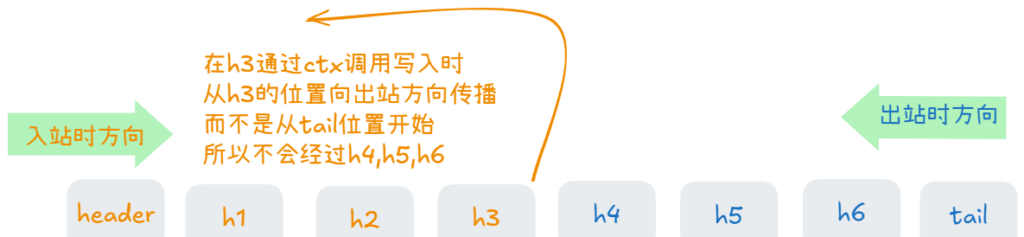
Handler 是通过 ChannelPipeline 进行组织和管理的(ChannelPipeline管理着Handler)。每个 Channel 都有一个 ChannelPipeline,它是一个双向链表,包含一组 Handler。当有 I/O 事件发生时,事件会在 ChannelPipeline 中沿链表传播。
- 入站事件传播:从链表头开始,事件依次传递给
ChannelInboundHandler (handler的一个实现类) 。 - 出站事件传播:从链表尾开始,事件依次传递给
ChannelOutboundHandler (handler的一个实现类) 。
下面代码我们向服务端的 ChannelPipeline 中添加了 编码器、解码器、3个入站handler和3个出站handler

public class Service {
    private static final Logger log = LoggerFactory.getLogger(Main.class);
    public static void main(String[] args) throws InterruptedException {

        new ServerBootstrap().group(new NioEventLoopGroup())
                .channel(NioServerSocketChannel.class)
                .childHandler(new ChannelInitializer<NioSocketChannel>() {
                    @Override
                    protected void initChannel(NioSocketChannel ch) throws Exception {
                        ChannelPipeline pipeline = ch.pipeline();
                        pipeline.addLast(new StringEncoder());
                        pipeline.addLast(new StringDecoder());

                        pipeline.addLast("h1",new ChannelInboundHandlerAdapter(){
                            @Override
                            public void channelRead(ChannelHandlerContext ctx, Object msg) throws Exception {
                                log.info("h1: {}", msg);
                                super.channelRead(ctx, msg);    // 将处理结果传递给下一个入站处理器
                            }
                        });
                        pipeline.addLast("h2",new ChannelInboundHandlerAdapter(){
                            @Override
                            public void channelRead(ChannelHandlerContext ctx, Object msg) throws Exception {
                                log.info("h2: {}", msg);
                                super.channelRead(ctx, msg);    // 将处理结果传递给下一个入站处理器
                            }
                        });
                        pipeline.addLast("h3",new ChannelInboundHandlerAdapter(){
                            @Override
                            public void channelRead(ChannelHandlerContext ctx, Object msg) throws Exception {
                                log.info("h3: {}", msg);
                                // super.channelRead(ctx, msg);        // 没有入站处理器了,所以不用写
                                ch.writeAndFlush(msg);    // 向客户端发送消息,触发出站事件
                            }
                        });

                        pipeline.addLast("h4", new ChannelOutboundHandlerAdapter(){
                            @Override
                            public void write(ChannelHandlerContext ctx, Object msg, ChannelPromise promise) throws Exception {
                                log.info("h4 write: {}", msg);
                                super.write(ctx, msg, promise);        //保证了消息能够继续流动到下一个出站处理器
                            }
                        });
                        pipeline.addLast("h5", new ChannelOutboundHandlerAdapter(){
                            @Override
                            public void write(ChannelHandlerContext ctx, Object msg, ChannelPromise promise) throws Exception {
                                log.info("h5 write: {}", msg);
                                super.write(ctx, msg, promise);        // 保证了消息能够继续流动到下一个出站处理器
                            }
                        });
                        pipeline.addLast("h6", new ChannelOutboundHandlerAdapter(){
                            @Override
                            public void write(ChannelHandlerContext ctx, Object msg, ChannelPromise promise) throws Exception {
                                log.info("h6 write: {}", msg);
                                // super.write(ctx, msg, promise);
                            }
                        });
                    }
                }).bind(8888);
    }
}
上述代码的控制台输出如下:
// 当客户端发送 hello 时控制台输出
10:52:15.785 [nioEventLoopGroup-2-2] - h1: hello
10:52:15.787 [nioEventLoopGroup-2-2] - h2: hello
10:52:15.787 [nioEventLoopGroup-2-2] - h3: hello
10:52:15.787 [nioEventLoopGroup-2-2] - h6 write: hello
10:52:15.787 [nioEventLoopGroup-2-2] - h5 write: hello
10:52:15.787 [nioEventLoopGroup-2-2] - h4 write: helloChannelHandlerContext 中也包含 writeAndFlush,如果我们把上面 h3 中的 ch.writeAndFlush(msg); 换成 ctx.writeAndFlush(msg); ,可以发现写入事件并没有经过 h4,h5,h6事件处理。原因如下
5.3 Handler 实现类和方法
Netty 提供了以下常用的 Handler 实现:
| 实现类 | 描述 |
|---|---|
ChannelInboundHandlerAdapter | 入站事件处理器的适配器,方便只实现需要的方法。(示例代码用到) |
ChannelOutboundHandlerAdapter | 出站事件 处理器的适配器,方便只实现需要的方法。(示例代码用到) |
SimpleChannelInboundHandler | 入站事件处理器,简化了数据类型的解析,避免手动释放ByteBuf。 |
ChannelDuplexHandler | 同时处理入站和出站事件的处理器。 |
| 方法名 | 类型 | 描述 |
|---|---|---|
channelRegistered | 入站 | Channel 被注册到 EventLoop 时触发。 |
channelUnregistered | 入站 | Channel 从 EventLoop 中注销时触发。 |
channelActive | 入站 | Channel 连接建立并活跃时触发(例如连接已建立)。 |
channelInactive | 入站 | Channel 断开连接时触发。 |
channelRead | 入站 | Channel 中有数据可读时触发。 (上面的示例代码用到的就是这个) |
channelReadComplete | 入站 | 读操作完成时触发。 |
write | 出站 | 向远程发送数据时触发。 (上面的示例代码用到的就是这个) |
flush | 出站 | 刷新缓冲区中的数据到远程。 |
exceptionCaught | 入站/出站 | 捕获到异常时触发。 |
5.4. Pipeline 常用方法
ChannelPipeline 提供了一系列操作,用于管理 Handler 和触发事件。
| 方法 | 描述 |
|---|---|
addFirst(handler) | 在链表的头部添加一个Handler。 |
addLast(handler) | 在链表的尾部添加一个Handler。 |
addBefore(baseName, handler) | 在指定的Handler之前插入一个新的Handler。 |
addAfter(baseName, handler) | 在指定的Handler之后插入一个新的Handler。 |
remove(handler) | 从 Pipeline 中移除指定的Handler。 |
replace(oldHandler, newHandler) | 替换一个现有的Handler。 |
get(handlerName) | 根据名称获取一个Handler。 |
first() | 获取第一个Handler。 |
last() | 获取最后一个Handler。 |
6. ByteBuf
在 Netty 中,ByteBuf 是一个高效的字节缓冲区,专为网络通信设计,用于替代 Java NIO 中的 ByteBuffer。
它克服了 ByteBuffer 的一些局限性,如容量固定、API 繁琐等,提供了更灵活、强大的功能。
6.1 特点
- 动态扩容:
ByteBuf可以动态扩展大小,无需手动管理。 - 零拷贝:提供了一些优化数据复制的功能,如切片、复合缓冲区等。
- 读写分离:
ByteBuf 提供了读索引和写索引,分别用于管理读写操作,避免了ByteBuffer 中的flip 和rewind。 - 池化支持:Netty 提供了池化的
ByteBuf,重用池中实例,减少了内存分配和回收的开销。并且采用了内存分配算法,提升分配效率。
6.2 创建
Netty 提供了几种方式来创建 ByteBuf,最常见的有以下几种:
- 堆内存
ByteBuf
通过Unpooled.buffer()创建,分配在 JVM 堆上,适用于一般的数据处理。 - 直接内存
ByteBuf
通过Unpooled.directBuffer()创建,分配在操作系统的直接内存上,适合 I/O 密集型应用,性能较高,但内存管理较为复杂。 - 池化内存
ByteBuf
通过PooledByteBufAllocator 创建,分配的内存会存储在 Netty 内部的内存池中(堆内存或直接内存,PooledByteBufAllocator会维护一组大小不同的内存块)。在netty内存池中创建的Buffer会缓存,从而减少内存的分配和回收开销。
堆内存
// 创建一个默认大小的 ByteBuf(256)ByteBuf buf2 = Unpooled.buffer(512); // 创建一个指定大小(512字节)的 ByteBuf
ByteBuf buf = Unpooled.buffer();
直接内存
// 创建一个 512 字节的直接内存 ByteBuf
ByteBuf directBuf = Unpooled.directBuffer(512);
池化内存
// 从内存池中分配 512 字节的 ByteBuf
ByteBuf pooledBuf = PooledByteBufAllocator.DEFAULT.buffer(512);
6.3 常用方法
| 方法 | 功能 |
|---|---|
readByte() | 读取一个字节,并移动readerIndex。 |
writeByte(byte b) | 写入一个字节,并移动writerIndex。 |
getByte(int index) | 获取指定索引处的字节,不会改变readerIndex。 |
setByte(int index, byte b) | 设置指定索引处的字节,不会改变writerIndex。 |
readableBytes() | 返回可读字节数,即writerIndex - readerIndex。 |
writableBytes() | 返回可写字节数,即capacity - writerIndex。 |
capacity() | 返回缓冲区的容量。 |
clear() | 重置readerIndex和writerIndex,但数据不会被清空。 |
slice(int index, int length) | 返回一个ByteBuf的切片,引用原缓冲区的数据。 |
retain() | 增加引用计数,避免缓冲区被释放。 |
release() | 减少引用计数,释放缓冲区。如果引用计数为 0,则缓冲区会被回收。 |
6.4 ByteBuf 内存回收
在 Netty 中,ByteBuf 实现了 ReferenceCounted 接口,利用 引用计数(Reference Counting) 来管理内存的生命周期。
-
retain()增加引用计数,防止缓冲区被释放。 -
release()减少引用计数,当计数为 0 时,缓冲区会被释放。
示例:
// 增加引用计数buf.release(); // 减少引用计数buf.release(); // 引用计数为 0,缓冲区被释放
ByteBuf buf = Unpooled.buffer(10);buf.retain();
补充:对于 channelPipeline 的 header 和 tail 会检查传递到最后的如果msg依然是ByteBuf,并且没有释放的话,它会自动地调用release来释放。
6.5 零拷贝
1. slice
切片操作:通过 slice() 可以把一个 ByteBuf 分割成多个 子ByteBuf,并且这个 ByteBuf 与原始 ByteBuf 共享内存空间,不会涉及内存拷贝。通过slice()获取到的新Bytebuf有独立的读写索引。
public class ByteBufTest {
    private static final Logger log = LoggerFactory.getLogger(Main.class);
    public static void main(String[] args) {
        ByteBuf bf = PooledByteBufAllocator.DEFAULT.buffer();
        bf.writeBytes("hello world".getBytes());
        log.info("{}", bf.toString(StandardCharsets.UTF_8));


        ByteBuf bf1 = bf.slice(0, 5);    // 下标0,5个字节
        log.info("{}", bf1.toString(StandardCharsets.UTF_8));

        ByteBuf bf2 = bf.slice(5, 6);    // 下标5,6个字节
        log.info("{}", bf2.toString(StandardCharsets.UTF_8));
    }
}
上述代码的控制台输出如下:
// 控制台输出
17:33:46.831 [main] - hello world
17:33:46.833 [main] - hello
17:33:46.833 [main] -  world
注意:通过 slice() 获取的 ByteBuf 不存在内存的复制,它的内存还是原本 ByteBuf 的一部分,并且获取到的 ByteBuf (bf1,bf2) 不会再自动增长,即不能再向其中添加字节。
2. duplicate
duplicate() 可以创建一个新的 ByteBuf,这个 ByteBuf 与原始 ByteBuf 共享内存空间,不会涉及内存拷贝。跟 Slice 不同的是它创建的ByteBuf是一个完整的副本,而且可以 自增长。
public class ByteBufTest {
    private static final Logger log = LoggerFactory.getLogger(Main.class);
    public static void main(String[] args) {
        ByteBuf bf = PooledByteBufAllocator.DEFAULT.buffer();
        bf.writeBytes("hello world".getBytes());
        log.info("{}", bf.toString(StandardCharsets.UTF_8));

        ByteBuf bf1 = bf.duplicate();
        log.info("{}", bf1.toString(StandardCharsets.UTF_8));

        bf1.writeByte((byte) 'W');    // 可以向里面写入, 但是通过slice获取的不可以
        log.info("{}", bf1.toString(StandardCharsets.UTF_8));
    }
}
上述代码的控制台输出如下:
// 控制台输出
18:16:51.138 [main] - hello world
18:16:51.140 [main] - hello world
18:16:51.140 [main] - hello worldW补充:copy() 方法是深拷贝。
3. CompositeByteBuf
CompositeByteBuf 可以用来将多个物理上的 ByteBuf 组合成一个逻辑上单一的 ByteBuf 视图.
public class ByteBufTest {
    private static final Logger log = LoggerFactory.getLogger(Main.class);
    public static void main(String[] args) {
        ByteBuf bf1 = PooledByteBufAllocator.DEFAULT.buffer();
        bf1.writeBytes("hello".getBytes());

        ByteBuf bf2 = PooledByteBufAllocator.DEFAULT.buffer();
        bf2.writeBytes("world".getBytes());

        CompositeByteBuf bf = ByteBufAllocator.DEFAULT.compositeBuffer();
        bf.addComponents(true, bf1, bf2);
        log.info("{}", bf.toString(StandardCharsets.UTF_8));
    }
}
上述代码的控制台输出如下:
// 控制台输出
18:16:55.138 [main] - hello world
代码首先创建了一个空的 CompositeByteBuf。
接着使用 addComponents 方法将 bf1 和 bf2 添加进去。
注意这里的 true 参数非常关键,它表示在添加这些组件时,自动递增组合 Buffer 的写指针(writerIndex)。
如果缺少了这个 true(或者使用默认的 addComponents(bf1, bf2)),bf 的写指针会保持为 0,后续读取时会读不到任何数据。
最终打印出来的结果会是完整的 "helloworld"。对外表现来看,bf 就像是一个连续的字节数组。
三、netty进阶
粘包和半包通常出现在网络编程中,尤其是在使用 TCP 协议进行数据传输时。它们是由于 TCP 是面向字节流的协议,数据发送和接收的边界并不一定和应用层数据的边界一致,从而导致的问题。
1. 粘包和半包
粘包:多个小的数据包被合并在一起,接收方无法区分每个数据包的边界。通常是因为接收端的缓冲区足够大、Nagle 算法等原因。
例如,发送方依次发送两个数据包:第一个包:abc、第二个包:def,如果发生粘包,接收方可能会一次性接收到合并后的数据 abcdef,无法知道原来是两个独立的数据包。
原因:
- TCP 是面向字节流的:TCP 协议在发送数据时,并没有定义数据包的边界。多个小的数据包可能会被合并为一个大的数据包一起发送给接收端,接收端就无法正确识别每个数据包的开始和结束。
- 接收方的缓冲区足够大:如果接收端的缓冲区(如
ByteBuf)很大,可以一次性接收多个数据包而没有及时处理,就会导致多个报文被“粘”在一起。 - Nagle 算法:Nagle 算法将小的数据包合并,以减少网络中的小包数。如果发送的数据量比较小(比如 1 字节),Nagle 算法可能会将多个小包合并为一个大包来发送,导致接收方一次接收到多个数据包,产生粘包。
半包:一个数据包被拆分成多个 TCP 包,接收方一次接收到的数据不完整。通常是由于接收缓冲区不足、MSS 限制、滑动窗口等原因。
例如,发送方发送的数据包 abcdef,由于大小问题,接收方可能只接收到 abc 或 def 的一部分数据,剩下的部分需要等待后续的包才能拼接完整。
原因:
- 接收方缓冲区不够大:如果接收方的缓冲区(如
ByteBuf)小于发送的数据包大小,接收方无法一次性接收完整的数据包,只能接收部分数据。此时,剩余的数据就会继续等待。 - 滑动窗口机制:TCP 协议有一个滑动窗口机制控制流量。如果接收方的窗口(缓冲区)空间不够,它可能会分批接收数据。例如,接收方的窗口剩余空间仅有 128 字节,但发送方发送的数据包大小为 256 字节,接收方就只能先接收 128 字节,剩余部分在窗口足够时继续接收。
- MSS 限制:MSS(最大报文段大小)是 TCP 协议中规定的最大单个数据包大小。发送的数据如果超过了 MSS,TCP 会将数据切割成多个小包进行传输。接收方可能需要多次接收才能拼接出完整的数据包。
2. 解决粘包和半包问题
2.1 固定消息长度
使用FixedLengthFrameDecoder 用来指定服务端每次接受消息的长度len,如果接受到的消息小于 len,那么它会等待下个消息,并把这两个消息合并成 len 长度,然后发送。
FixedLengthFrameDecoder 适合定长消息的场景,对于定长消息的场景下可以解决粘包和半包问题。
如果发送的消息长度超过 len,那么这个消息会被切割,先发送 len 长度的消息。
public class Service {
    private static final Logger log = LoggerFactory.getLogger(Main.class);
    public static void main(String[] args) throws InterruptedException {
        ServerBootstrap serverBootstrap = new ServerBootstrap();
        NioEventLoopGroup boss = new NioEventLoopGroup(1);
        NioEventLoopGroup worker = new NioEventLoopGroup();

        try {
            ChannelFuture bind = serverBootstrap
                    .group(boss, worker)
                    .channel(NioServerSocketChannel.class)
                    .childHandler(new ChannelInitializer<NioSocketChannel>() {
                        @Override
                        protected void initChannel(NioSocketChannel ch) throws Exception {
                            ChannelPipeline pip = ch.pipeline();
                            pip.addLast(new FixedLengthFrameDecoder(10));    // <----- 指定每次接受的长度是10
                            pip.addLast(new LoggingHandler(LogLevel.DEBUG));
                        }
                    }).bind(8888).sync();
            bind.channel().closeFuture().sync();
        } finally {
            boss.shutdownGracefully();
            worker.shutdownGracefully();
        }
    }
}
2.2 分割符
-
LineBasedFrameDecoder
可以根据\n 来作为消息的分隔符,只有遇到\n时才会发送和接受消息,同时,它可以设置一个最大消息长度,当消息长度超过这个值时会抛出异常。
public class Service {
    private static final Logger log = LoggerFactory.getLogger(Main.class);
    public static void main(String[] args) throws InterruptedException {
        ServerBootstrap serverBootstrap = new ServerBootstrap();
        NioEventLoopGroup boss = new NioEventLoopGroup(1);
        NioEventLoopGroup worker = new NioEventLoopGroup();

        try {
            ChannelFuture bind = serverBootstrap
                    .group(boss, worker)
                    .channel(NioServerSocketChannel.class)
//                    .childOption(ChannelOption.RCVBUF_ALLOCATOR, new AdaptiveRecvByteBufAllocator(16, 16, 16))
                    .childHandler(new ChannelInitializer<NioSocketChannel>() {
                        @Override
                        protected void initChannel(NioSocketChannel ch) throws Exception {
                            ChannelPipeline pip = ch.pipeline();
                            pip.addLast(new LineBasedFrameDecoder(16));    // <----- 指定最大长度
                            pip.addLast(new LoggingHandler(LogLevel.DEBUG));
                        }
                    }).bind(8888).sync();
            bind.channel().closeFuture().sync();
        } finally {
            boss.shutdownGracefully();
            worker.shutdownGracefully();
        }
    }
}-
DelimiterBasedFrameDecoder
与LineBasedFrameDecoder类似,遇到分隔符才会发送接受消息,只不过它可以指定分隔符是什么。
public class Service {
    private static final Logger log = LoggerFactory.getLogger(Main.class);
    public static void main(String[] args) throws InterruptedException {
        ServerBootstrap serverBootstrap = new ServerBootstrap();
        NioEventLoopGroup boss = new NioEventLoopGroup(1);
        NioEventLoopGroup worker = new NioEventLoopGroup();

        try {
            ChannelFuture bind = serverBootstrap
                    .group(boss, worker)
                    .channel(NioServerSocketChannel.class)
//                    .childOption(ChannelOption.RCVBUF_ALLOCATOR, new AdaptiveRecvByteBufAllocator(16, 16, 16))
                    .childHandler(new ChannelInitializer<NioSocketChannel>() {
                        @Override
                        protected void initChannel(NioSocketChannel ch) throws Exception {
                            ChannelPipeline pip = ch.pipeline();
                            pip.addLast(new DelimiterBasedFrameDecoder(16, Unpooled.wrappedBuffer("A".getBytes())));    // <---- 指定最大长度和分割符
                            pip.addLast(new LoggingHandler(LogLevel.DEBUG));
                        }
                    }).bind(8888).sync();
            bind.channel().closeFuture().sync();
        } finally {
            boss.shutdownGracefully();
            worker.shutdownGracefully();
        }
    }
}
2.3 LengthFieldBasedFrameDecoder
LengthFieldBasedFrameDecoder 通过指定每个消息前面携带一些额外的信息来解决粘包和半包问题,是比较常用的处理粘包和半包的处理器
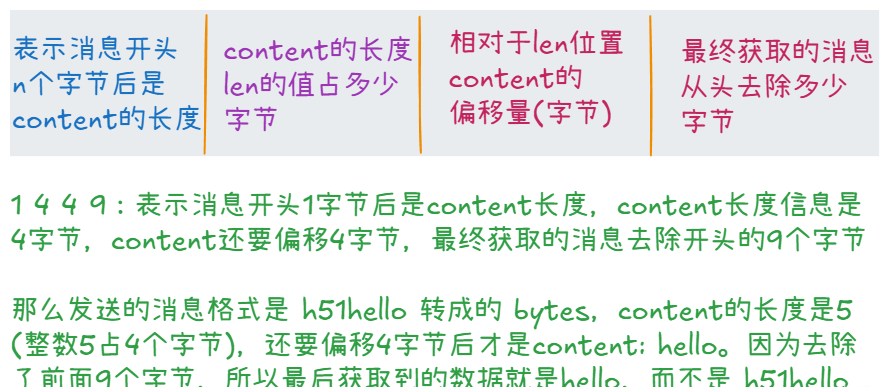
LengthFieldBasedFrameDecoder 是要求每个单独的消息前面都加上一个len,来指定 content 有多长(content是我们真正需要的消息)。
当content长度小于len时,消息不会继续向下传递,而是在 pip.addLast(new LengthFieldBasedFrameDecoder(128, 0, 4, 0, 4)); 这里等待,直到content的长度等于len时,才会继续向下传递,所以 LengthFieldBasedFrameDecoder 可以解决粘包和半包问题。
LengthFieldBasedFrameDecoder 接受5个参数,第一个参数是消息的最大长度,超过最大长度会抛出异常。其余四个参数含义如下
public class Service {
    private static final Logger log = LoggerFactory.getLogger(Main.class);
    public static void main(String[] args) throws InterruptedException {
        ServerBootstrap serverBootstrap = new ServerBootstrap();
        NioEventLoopGroup boss = new NioEventLoopGroup(1);
        NioEventLoopGroup worker = new NioEventLoopGroup();

        try {
            ChannelFuture bind = serverBootstrap
                    .group(boss, worker)
                    .channel(NioServerSocketChannel.class)
                    .childHandler(new ChannelInitializer<NioSocketChannel>() {
                        @Override
                        protected void initChannel(NioSocketChannel ch) throws Exception {
                            ChannelPipeline pip = ch.pipeline();
                            pip.addLast(new LengthFieldBasedFrameDecoder(128, 0, 4, 0, 4));
                            pip.addLast(new LoggingHandler(LogLevel.DEBUG));
                        }
                    }).bind(8888).sync();
            bind.channel().closeFuture().sync();
        } finally {
            boss.shutdownGracefully();
            worker.shutdownGracefully();
        }
    }
}
// 发送的消息是 5hello
// 接受到的是 hello,因为我们的第5个参数是4,去除4个字节,即数字5
3. http 和 自定义协议
针对不同的协议,netty提供了很多封装好的 编解码处理器,通过这个处理器我们可以很容易的基于某个协议来解析收到的消息和对发送的消息编码。当然我们也可以自定义协议,通过实现接口自定义编解码器。
3.1 http
添加HttpServerCodec 后,对于接的所有消息都会根据 http 协议 进行解析,所有发送的消息也会根据http协议封装。
对于一个传入的消息,经过http协议解析后会分成两次消息,分别是 HttpRequest (请求头)或 HttpContent (请求体, get 的请求体为空)
@Slf4j
public class HttpTest {
    public static void main(String[] args) {
        NioEventLoopGroup boss = new NioEventLoopGroup(1);
        NioEventLoopGroup worker = new NioEventLoopGroup();
        ServerBootstrap bootstrap = new ServerBootstrap();

        try {
            ChannelFuture bind = bootstrap
                    .group(boss, worker)
                    .channel(NioServerSocketChannel.class)
                    .childHandler(new ChannelInitializer<NioSocketChannel>() {
                        @Override
                        protected void initChannel(NioSocketChannel ch) throws Exception {
                            ChannelPipeline pip = ch.pipeline();
                            pip.addLast(new LoggingHandler(LogLevel.DEBUG));
                            pip.addLast(new HttpServerCodec());
                            pip.addLast(new SimpleChannelInboundHandler<HttpRequest>() {    // 指定类型,只接受HttpRequest的消息
                                @Override
                                protected void channelRead0(ChannelHandlerContext ctx, HttpRequest msg) throws Exception {
                                    log.info(msg.uri());

                                    byte[] resp = "<h1>hello world<h1/>".getBytes();
                                    DefaultFullHttpResponse response = new DefaultFullHttpResponse(msg.protocolVersion(),
                                            HttpResponseStatus.OK); // 设置响应的http版本和状态码
                                    response.headers().setInt(CONTENT_LENGTH, resp.length); // 设置http的内容长度,如果不设置浏览器会一直尝试获取content
                                    response.content().writeBytes(resp);    // 把要返回的内容写道content中
                                    ctx.writeAndFlush(response);    // 通过channel发送数据给客户端
                                }
                            });
                        }
                    })
                    .bind(8888)
                    .sync();
            bind.channel().closeFuture().sync();
        } catch (InterruptedException e) {
            throw new RuntimeException(e);
        } finally {
            boss.shutdownGracefully();
            worker.shutdownGracefully();
        }
    }
}
3.2 自定义协议
上面我们简介介绍了一下http的编解码器,我们也可以根据 自定义的协议可以实现自定义解码器中的 decode 方法,编码器中的 edcode方法,也可以继承 ByteToMessageCodec 或 MessageToMessageCodec, 实现其中的 decode 和 encode 方法
- 解码器(
ByteToMessageDecoder):将字节流解析为应用层的消息。 - 编码器(
MessageToByteEncoder):将应用层的消息编码为字节流。
// 用于将 二进制 与 消息 对象之间进行转换的工具类。
public class MessageCodec extends ByteToMessageCodec<MyMessage> {
    @Override
    protected void encode(ChannelHandlerContext ctx, MyMessage msg, ByteBuf out) throws Exception {
        // 将 msg 转化成 按照自定义协议的 二进制字节流
        // 编码后的字节流将被写入这个 ByteBuf 中,最终通过 Netty 传输到网络
    }

    @Override
    protected void decode(ChannelHandlerContext ctx, ByteBuf in, List<Object> out) throws Exception {
        // 将从网络接收到的字节流 in 解码成 MyMessage 对象。
        // List<Object> out:解码后的消息对象将被添加到这个列表中,供后续的处理流程使用。
    }
}
// 用于将 消息 与 消息 对象之间进行转换的工具类。
// 这里设置的输入消息类型是 ByteBuf,输出的类型是MyMessage
// @ChannelHandler.Sharable 注解标识了线程安全
@ChannelHandler.Sharable
public class MessageCodec extends MessageToMessageCodec<ByteBuf, MyMessage> {
@Override
protected void encode(ChannelHandlerContext ctx, MyMessage msg, List<Object> out) throws Exception {
}
@Override
protected void decode(ChannelHandlerContext ctx, ByteBuf msg, List<Object> out) throws Exception {
}
}4. 线程安全性
@ChannelHandler.Sharable
以注解的方式存在,将注解标识到类的最上方即可。示例可参考上方的代码。
标记用于表明该 ChannelHandler 是线程安全的,并且可以在多个 Channel 之间共享。
观察可以发现对于 LengthFieldBasedFrameDecoder,我们并没有把他提取成一个变量,这是由于它是线程不安全的,每个客户端发送消息到服务端都会经过各自channel的pipeLine进行加工,当发送的消息的 content 不足时,由于 LengthFieldBasedFrameDecoder的存在,消息并不会继续向下传递,而是保存当前消息的状态,直到content满足len时才会被发送。
在多线程的环境下每个channel都需要一个LengthFieldBasedFrameDecoder 才可以。
@Slf4j
public class Test2 {
    public static void main(String[] args) {
        ServerBootstrap bootstrap = new ServerBootstrap();
        NioEventLoopGroup boss = new NioEventLoopGroup(1);
        NioEventLoopGroup worker = new NioEventLoopGroup();

        LoggingHandler logHandler = new LoggingHandler(LogLevel.DEBUG);
        MessageCodec messageCodec = new MessageCodec();

        try {
            ChannelFuture bind = bootstrap
                    .group(boss, worker)
                    .channel(NioServerSocketChannel.class)
                    .childHandler(new ChannelInitializer<NioSocketChannel>() {
                        @Override
                        protected void initChannel(NioSocketChannel ch) throws Exception {
                            ChannelPipeline pip = ch.pipeline();
                            pip.addLast(new LengthFieldBasedFrameDecoder(128, 0, 4, 0, 0));    // 处理粘包、半包
                            pip.addLast(logHandler);    // <------ 打印输出日志
                            pip.addLast(messageCodec);    // <------ 自定义消息编解码器
                        }
                    })
                    .bind(8888)
                    .sync();
            bind.channel().closeFuture().sync();
        } catch (InterruptedException e) {
            throw new RuntimeException(e);
        } finally {
            boss.shutdownGracefully();
            worker.shutdownGracefully();
        }
    }
}
补充:在 3.2 中 ByteToMessageCodec 和 MessageToMessageCodec 除了输入的消息类型不同外,通过继承 ByteToMessageCodec 实现的自定义编解码器默认是线程不安全的,不能加 @ChannelHandler.Sharable 注解,因为ByteToMessageCodec 中会检测,如果其子类加这个注解的话会报错。
其实是否线程安全还要看代码逻辑,对于不存储状态、可以在多个 Channel 中共享的handler都可以作为线程安全的。
5. 空闲检测和心脏跳动
5.1 空闲检测
IdleStateHandler 是 Netty 中一个用于处理 空闲状态(idle state)事件的 ChannelHandler。
它用于检测 连接在指定时间内是否处于空闲状态,并触发相应的事件。常用于 连接超时、心跳检测 等场景。
如果在指定的时间段内没有发生任何入站(读)或出站(写)的操作,IdleStateHandler 就会触发一个 IdleStateEvent。触发IdleStateEvent事件时,会调用 userEventTriggered 来处理超时逻辑。
// IdleStateHandler 接受四个参数
public IdleStateHandler(
    long readerIdleTime, // 读空闲时间
    long writerIdleTime, // 写空闲时间
    long allIdleTime,    // 读写空闲时间
    TimeUnit unit        // 时间单位
)

@Slf4j
public class Test2 {
    public static void main(String[] args) {
        ServerBootstrap bootstrap = new ServerBootstrap();
        NioEventLoopGroup boss = new NioEventLoopGroup(1);
        NioEventLoopGroup worker = new NioEventLoopGroup();

        LoggingHandler logHandler = new LoggingHandler(LogLevel.DEBUG);

        try {
            ChannelFuture bind = bootstrap
                    .group(boss, worker)
                    .channel(NioServerSocketChannel.class)
                    .childHandler(new ChannelInitializer<NioSocketChannel>() {
                        @Override
                        protected void initChannel(NioSocketChannel ch) throws Exception {
                            ChannelPipeline pip = ch.pipeline();
                            pip.addLast(logHandler);
                            pip.addLast(new IdleStateHandler(5,0, 0, TimeUnit.SECONDS));
                            pip.addLast(new ChannelDuplexHandler() {    // 双向的 处理器,既能处理 入站事件,也可以处理 出站事件
                                @Override
                                public void userEventTriggered(ChannelHandlerContext ctx, Object evt) throws Exception {
                                    if (evt instanceof IdleStateEvent) {    // 判断是否是 IdleStateEvent 事件
                                        IdleStateEvent event = (IdleStateEvent) evt;
                                        log.info("{}", event.state());
                                        if (event.state() == IdleState.READER_IDLE) {
                                            log.info("读超时 {}", event.state());
                                            ctx.close(); // 关闭通道
                                        }
                                    }
                                }
                            });
                        }
                    })
                    .bind(8888)
                    .sync();
            bind.channel().closeFuture().sync();
        } catch (InterruptedException e) {
            throw new RuntimeException(e);
        } finally {
            boss.shutdownGracefully();
            worker.shutdownGracefully();
        }
    }
}
5.2 心脏跳动
package learn1;

import io.netty.bootstrap.Bootstrap;
import io.netty.buffer.ByteBuf;
import io.netty.buffer.ByteBufAllocator;
import io.netty.channel.*;
import io.netty.channel.nio.NioEventLoopGroup;
import io.netty.channel.socket.nio.NioSocketChannel;
import io.netty.handler.codec.string.StringEncoder;
import io.netty.handler.timeout.IdleState;
import io.netty.handler.timeout.IdleStateEvent;
import io.netty.handler.timeout.IdleStateHandler;
import org.slf4j.Logger;
import org.slf4j.LoggerFactory;

import java.util.Scanner;
import java.util.concurrent.TimeUnit;

public class Client {
    private static final Logger log = LoggerFactory.getLogger(Main.class);
    public static void main(String[] args) throws InterruptedException {
        NioEventLoopGroup group = new NioEventLoopGroup();
        ChannelFuture connectFuture = new Bootstrap()
                .group(group)
                .channel(NioSocketChannel.class)
                .handler(new ChannelInitializer<NioSocketChannel>() {
                    @Override
                    protected void initChannel(NioSocketChannel ch) throws Exception {
                        ChannelPipeline pip = ch.pipeline();
                        pip.addLast(new IdleStateHandler(0,3, 0, TimeUnit.SECONDS));    // 添加写空闲时间
                        pip.addLast(new ChannelDuplexHandler() {
                            @Override
                            public void userEventTriggered(ChannelHandlerContext ctx, Object evt) throws Exception {
                                if (evt instanceof IdleStateEvent) {
                                    IdleStateEvent event = (IdleStateEvent) evt;
                                    log.info("{}", event.state());
                                    if (event.state() == IdleState.WRITER_IDLE) {
                                        ctx.writeAndFlush("心脏跳动");    // 每三秒向服务端发送一次消息
                                        log.info("发送数据,心脏跳动 {}", event.state());
                                    }
                                }
                            }
                        });
                    }
                })
                .connect("localhost", 8888);

        ChannelFuture closeFuture = connectFuture.channel().closeFuture();  // 获取关闭的结果
        closeFuture.sync(); // 阻塞, 直到调用close
        group.shutdownGracefully();
        log.info("{}", closeFuture);
    }
}
四、netty的调优参数
Netty 的参数调整通常分为两类:服务端参数 和 客户端参数,以及与性能相关的其他细节。具体来说,Netty 调整的参数可以从以下几个方面来分类:
1.服务端
这些参数主要用于配置服务端的 ServerBootstrap 和监听的 ServerSocketChannel,它们影响服务器接受连接的方式及性能。
-
option:设置与服务端ServerSocketChannel本身相关的选项。 -
SO_BACKLOG:连接请求队列的大小。增加队列大小可以处理更多的并发连接请求。(全连接,半连接) -
SO_REUSEADDR:允许端口地址重用,通常用于服务器重启时快速复用端口。 -
SO_RCVBUF:接收缓冲区的大小。调整该值可以控制接收数据的能力。 -
SO_SNDBUF:发送缓冲区的大小。调整该值可以控制发送数据的能力。 -
childOption:设置与每个客户端连接的SocketChannel相关的网络选项。 -
TCP_NODELAY:是否启用 Nagle 算法,适用于需要低延迟的场景。 -
SO_RCVBUF 和SO_SNDBUF:调整每个客户端连接的接收和发送缓冲区大小。 -
SO_KEEPALIVE:启用 TCP 保持活动(即连接活跃检测),用于防止连接超时。 -
SO_LINGER:控制关闭连接时的延迟。设置为 0 则会立即关闭连接。 -
IP_TOS:设置 IP 服务类型,用于区分不同类型的流量优先级。
2. 客户端
这些参数用于配置客户端 Bootstrap 和 SocketChannel,主要影响客户端连接和通信的行为。
-
option:设置与客户端连接的SocketChannel相关的网络选项。 -
CONNECT_TIMEOUT_MILLIS:设置客户端连接超时的最大时长,超时则连接失败。 -
SO_RCVBUF:客户端接收缓冲区的大小。 -
SO_SNDBUF:客户端发送缓冲区的大小。 -
SO_KEEPALIVE:启用 TCP 保持活动。 -
handler:用于配置客户端的事件处理器,例如请求的编码解码、业务逻辑处理等。